Qualtrics Resources
This page collects small scripts and code snippets for enhancing Qualtrics surveys. Each functionality has downloadable code and instructions for use. I am not a JavaScript specialist so codes may be imperfect, but these can provide a useful starter.
Summary of resources
| Functionality | Resource Types | Summary Description |
|---|---|---|
| Simple Customizable Sliders | JavaScript | Customizable sliders preserving native Qualtrics styles. Good to set up slider with personalized maximum/minimum values and change display values. |
| Constant Sum Sliders | JavaScript | Constant-sum set of sliders keeping native Qualtrics styles. Better implementation of the Constant Sum question type for Simple Layout -- sliders are disabled for this theme at the moment. Similar to "Balls and Bins" style of questions for allocation. |
| Embedding YouTube Video with Trackers | JavaScript, HTML | Embed a YouTube video with trackers to measure time spent on the video. |
| Slider-Controlled Dummy Visualization | JavaScript, HTML | Connects a Qualtrics slider to an iframe display that lights up dummy figures as the slider moves. Helps respondents visualize quantities easily. |
Simple Customizable Sliders
Description:
This script creates a custom Qualtrics sliders, preserving native styling. It works by recreating a slider using the exact structure from Qualtrics, which makes CSS styles apply to the created slider. You want to set a Text/Graphic question type and add this script as JavaScript. It allows you to customize the slider’s maximum and minimum values, places where you display values, and save the selected value as Embedded Data. The script also includes customization of visual elements following Qualtrics standard choices in a Slider question. No HTML is needed, just the JavaScript. It does not support adding images to the slider, though it supports emojis. Tested for the new Simple Layout Qualtrics theme – be aware that embedded data saved must be preffixed by “_js”. Importantly, the
-
Resources:
Constant Sum Sliders
Description:
This script creates a constant sum slider, useful for allocation problems without requiring participants to type. It lets you select categories and maximum allocation values that generate a set of sliders with a constant sum. Useful for time-allocation or belief elicitation questions. The Next button is disabled until the sum of the sliders equals the maximum value. You can customize to choose to “clamp” or “proportional”ly adjust the sliders once they reach the maximum allowed value. Choices are stored as embedded data using a prefix followed by the index of the choice – e.g., for 4 sliders and a prefix of “choice”, the embedded data becomes “choice1”, …, “choice4”. Tested for the new Simple Layout Qualtrics theme – be aware that embedded data saved must be preffixed by “_js”.
Embedding YouTube Video with Trackers
Description:
This script allows you to embed a YouTube video in a Qualtrics survey and track the time spent on the video. It uses the YouTube IFrame API to control the video playback and send tracking data to Qualtrics. The script includes functions to start and stop tracking when the video is played or paused, and it sends the tracking data as embedded data to Qualtrics. The script also includes a function to handle the end of the video and send the final tracking data. This script is useful for surveys that include video content and want to measure participant engagement with the video. You have to add the HTML code to the question body and the JavaScript code to the question’s JavaScript section. The video ID must be specified in the HTML code. Also useful if you want to randomize videos and send the ID through Embedded Data.
Summary of the Embedded Data Saved
| Embedded Data | Meaning |
|---|---|
WatchedVideoID | ID of video watched |
MaxTimeWatched | Farthest timestamp reached |
TotalTimeWatched | Total accumulated time playing |
JumpDetected | If a jump/skipping behavior was detected |
JumpFromWhen1, JumpToWhen1, etc. | Timestamps of skips (up to 5 skips) |
VolumeEvent1, VolumeTime1, etc. | Mute/Unmute events and when they happened (up to 5) |
QualityChange1, QualityTime1, etc. | Quality change events (up to 5) |
VideoStatus | Final status of the video ("Ended" or not) |
-
Resources:
Slider-Controlled Dummy Visualization
Description:
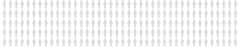
This script links a standard Qualtrics slider to a custom iframe visualization showing 1,000 dummy figures. As the respondent moves the slider, the script lights up one figure for every N units (e.g., every 5 units in the slider), offering a visual way to express estimates or beliefs. It uses postMessage to send data from the slider to the iframe hosted externally. This makes it easier for participants to engage with abstract numbers by visualizing them as people being selected. The script includes safeguards to check if the slider and iframe are correctly loaded. The full implementation of this code is not straightforward. First, my website hosts a specific “.svg” image, which is a type of archive used for dynamic images. Each image is constructed through vectors using specific code. In this example, I have a set of 200 dummies in a 5 x 40 lineup. The image is hosted here: Dummy Image. The Qualtrics JavaScript posts a message to a HTML script hosted on my website here. The HTML script is a simple iframe that receives the message and updates the image accordingly, passing color attributes to the “.svg” code. Therefore, if you are looking to implement specific instances of this code you might require different “.svg” files, different actions set-up in the website HTML, or different colors. For instance, my code constains an action called “lightUpBlack”, which is used to paint the grayed-out dummies into black dummies as the slider moves.
-
Resources: